
Price monitoring: the complete guide for e-commerce teams
What price monitoring is, how to set it up, which metrics to watch and how to choose a tool. A practical guide for e-commerce, retail and brands.
If you sell online, your competitors change prices several times a week. Some do it by hand, others with automated rules tied to their costs or to whoever is cheapest on Amazon. You find out when someone on your team happens to check, or when sales of a SKU drop and nobody quite knows why.
Price monitoring is the process of systematically capturing the prices of a set of products across a set of sellers, storing them over time and turning them into decisions. You'll also see it called price tracking or competitor price monitoring, and all three describe the same thing. This guide covers what to monitor, how to set it up, what to look at once you have the data and when it makes sense to buy a tool instead of building one.
What price monitoring actually is
Monitoring prices isn't "looking at competitors' websites." It's a process with four pieces that have to work together:
- A matched catalog. Knowing that your SKU 4412 is the same product as your competitor's listing. Without this, everything else compares apples to oranges.
- Regular capture. Price, list price, discount, stock availability, seller and date, on a defined schedule.
- A history. Today's price is of limited use; the last six months of data is what shows patterns.
- A trigger. Someone or something has to find out when things move, or the data sits in a dashboard nobody opens.
The difference between monitoring that works and a spreadsheet that gets abandoned after two months almost always comes down to points 1 and 4. Point 1 is the most underestimated: when we tracked 37 Argentine online stores every day, we found that 41% of what was on offer in August didn't exist ninety days earlier. Your scope needs regular review.
Retail and e-commerce price monitoring: what changes
The process is the same, but the emphasis shifts depending on who you are:
- E-commerce sellers and marketplace merchants care most about speed and the Buy Box. Prices on Amazon and Walmart move several times a day, so daily capture and seller-level data matter more than anything else.
- Retailers (physical, online or both) care about the price index across a whole category and about being consistent between channels. The question is usually "are we priced right against the three or four stores our customers also check?"
- Brands and distributors care less about competitors and more about their own resellers: who sells their products, at what price, and whether it respects their MAP. That's MAP monitoring, and it uses the same data with a different question.
If you're a retailer evaluating software, the page on retail pricing software covers what to require from a platform at that scale.
Why history matters more than today's price
This is the pattern that shows up again and again when a brand looks at its category with data for the first time:
With a one-off snapshot (checking prices on a Tuesday and writing them down) you can see you're expensive, but not since when, or whether it's a three-day promo or a new, sustained position. That difference completely changes the right response: matching a short promo is usually a mistake, and failing to react to a structural repositioning is worse.
History also helps with things that aren't about competitors:
- Spotting your category's real seasonality instead of assuming it.
- Checking whether a reseller respects your MAP or breaks it every time it needs cash.
- Documenting, with dates, an uncomfortable conversation with a distributor.
What to monitor: define the scope before the tool
The most expensive mistake is starting out wanting to monitor everything. A scope that works usually looks like this:
| Dimension | Recommended starting point | Why |
|---|---|---|
| Products | The 50–200 SKUs that drive most of your revenue | The long tail rarely justifies the noise |
| Competitors | 5–10 that really matter | More than that makes matching unmanageable |
| Channels | Your site, marketplaces and the 2–3 big retailers in your category | Where the purchase is actually decided |
| Frequency | Daily for the core, weekly for the rest | Daily on everything is expensive and rarely changes the decision |
| Fields | Final price, list price, stock, seller | Final price alone hides the promo |
Once the process runs and someone uses it every week, expanding is easy. The reverse isn't: a project that starts with 5,000 poorly matched SKUs gets abandoned before it produces its first result.
On channels, think wider than Amazon. In most US categories the price a shopper sees gets set across marketplaces, big-box retailers and brands' own stores, and they compare across all of them:
 Amazon
 Walmart
 Target
 Best Buy
 The Home Depot
 Costco
 Sam's Club
 eBay
eBay Etsy
Etsy Wayfair
 Chewy
Chewy Newegg
 Macy's
 Kohl's
 Temu
Temu Google Shopping
 Shopify
 WooCommerce
 BigCommerce
The hard problem: matching products
Comparing prices is trivial. Knowing what to compare isn't.
On marketplaces the same product shows up with different titles, in different pack sizes, with or without shipping included, with the seller's name stuffed into the title. Amazon, with many sellers competing on a single listing for the Buy Box, is a case of its own, covered in how to monitor competitor prices on Amazon. Matching gets solved in layers:
- Identifiers. GTIN/UPC/EAN and manufacturer part numbers when they're published. This is the clean path and the one to exhaust first.
- Attributes. Brand, model, capacity, color, units per pack.
- Text and similarity. For everything else, comparing titles and descriptions.
- Human review. Exceptions get reviewed by hand once and stay fixed.
Any tool that promises perfect, 100% automatic matching is oversimplifying. What you can ask for is that 90% happens on its own, and that the remaining 10% is easy to correct and doesn't break every time a competitor edits a title.
What to look at once you have the data
With history in place, these are the metrics that actually drive decisions:
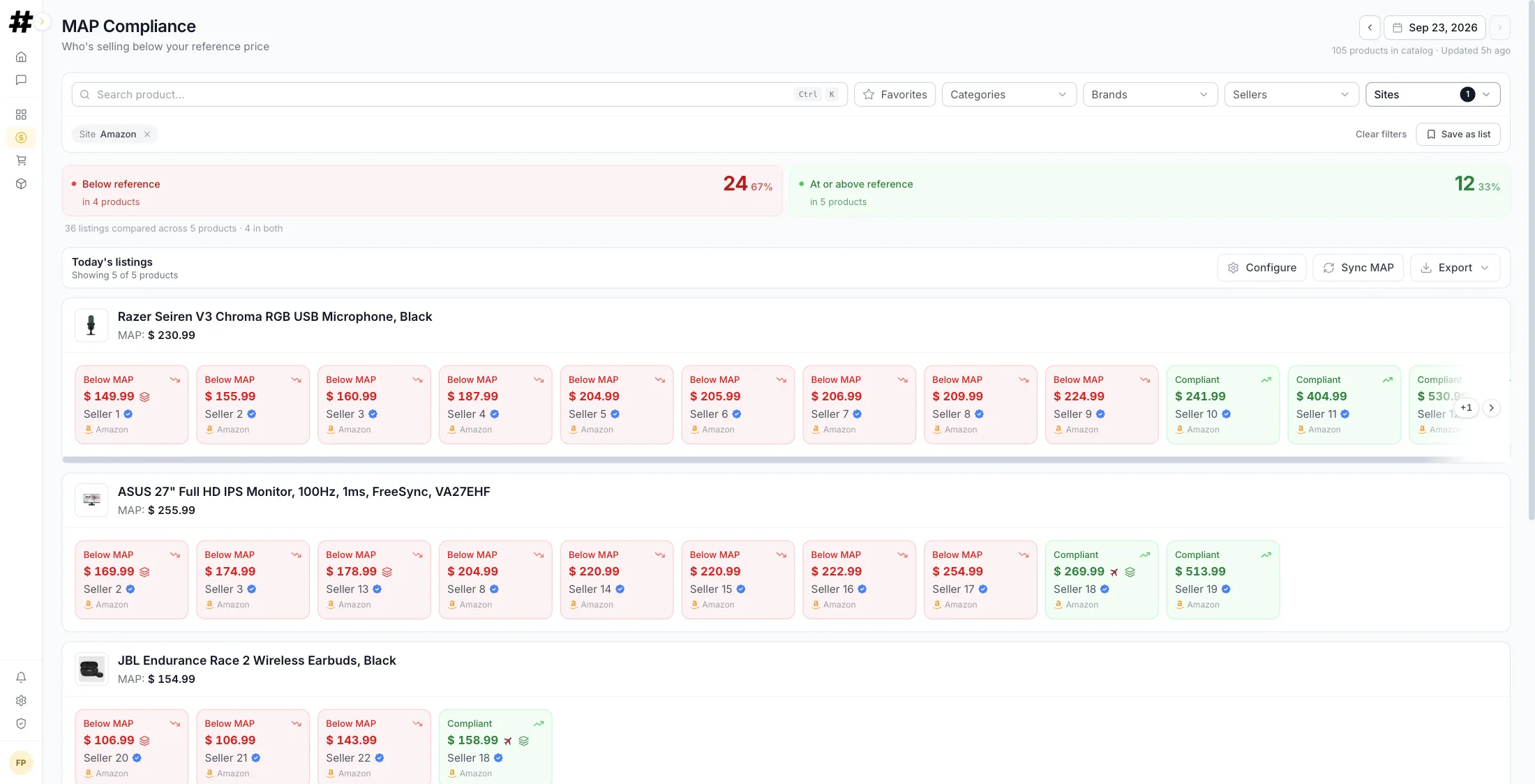
- Price index. Your price divided by the market average (or minimum), by SKU and by category. One number per product, comparable over time.
- Rank. Where you land in the price ranking. Dropping from third to seventh hurts a lot more than a 2% nominal gap.
- Gap to the cheapest. How far you are from the floor, and whether that floor is set by a serious competitor or by a small seller with no real stock.
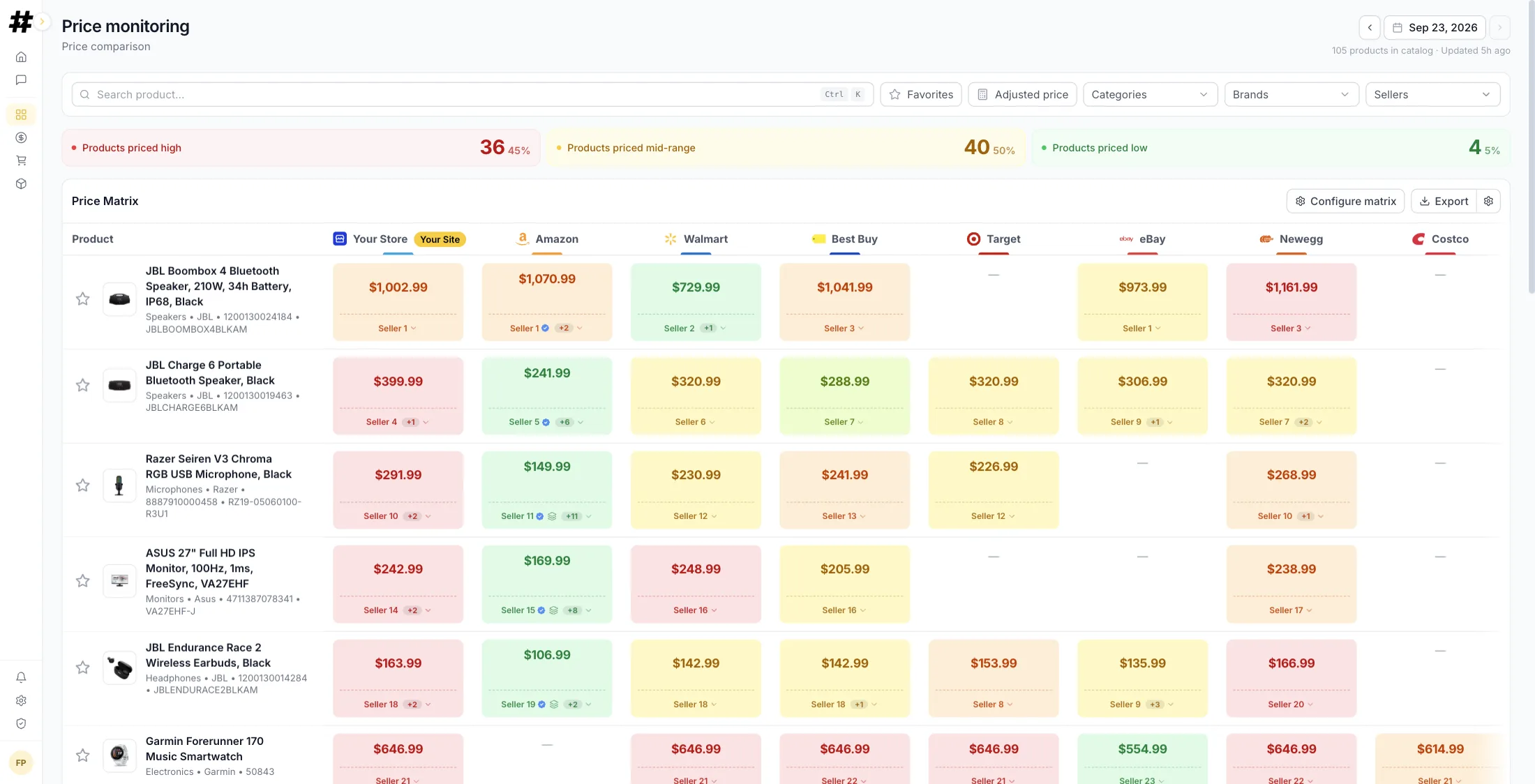
- MAP compliance. What percentage of your resellers advertise below your minimum advertised price, and which ones.
- Change frequency. Who moves prices every day and who moves them once a month. It tells you what kind of rival you're up against.
How often to capture
It depends on the category; there's no universal answer. A reasonable reference:
- Electronics, appliances and competitive marketplaces: daily. Prices move fast and promos don't last long.
- Consumer packaged goods and hardware: 2 to 3 times a week.
- Niche or slow-moving products: weekly.
Before increasing frequency, ask yourself whether you'll do anything different with the data. If your price-change process is weekly, capturing every hour just adds cost and noise.
By hand, in-house scraping or a platform
All three options are legitimate and fit different stages.
By hand works up to about 20 products and 3 competitors. It's free, you can start today and it doesn't depend on anyone. It falls apart when the catalog grows or when the person doing it goes on vacation.
In-house scraping gives you full control and low marginal cost. In exchange, someone on your team owns the fact that sites change their HTML, plus blocking, proxies, infrastructure and matching. It's an ongoing engineering commitment, not a two-week project.
A platform takes that maintenance off your plate and usually comes with the boring parts solved: matching, history, alerts, permissions, exports. You pay for it every month.
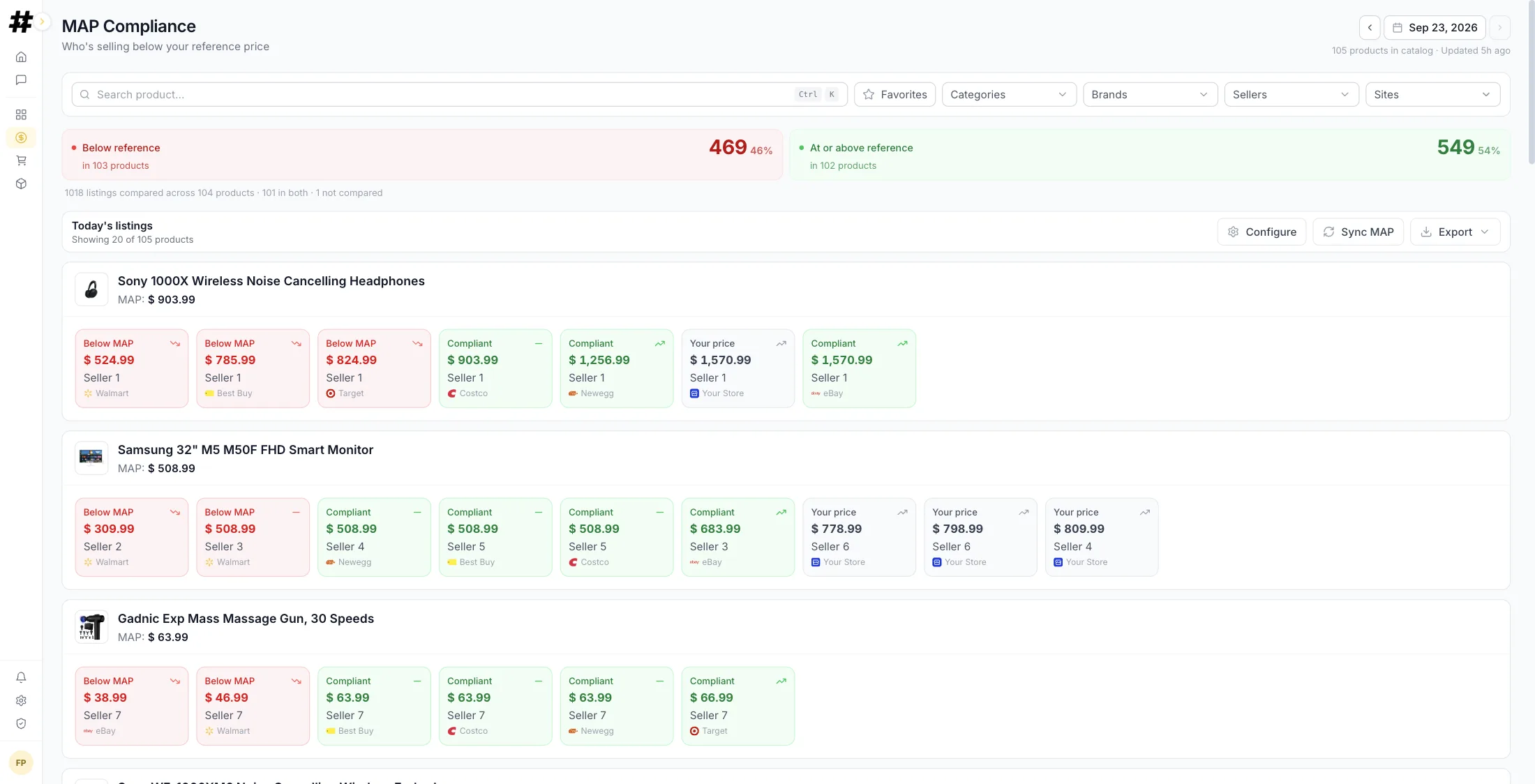
We go into detail in in-house scraping vs. price monitoring software, and if you're already evaluating vendors, in the price monitoring tools comparison. If you want to see how all of this translates into a concrete tool, it's in competitor price monitoring.
What to look for in a price monitoring system
Whether you build or buy, use this checklist to compare options. A system that fails the first three won't survive past the pilot:
- Matching you can audit. You should see why two listings were paired and be able to fix a wrong pair in one click.
- Coverage of the channels that matter to you. Marketplaces, big-box retailers and brand sites, not just the one that's easiest to scrape.
- Seller-level data. Who is selling, not just the lowest price.
- History you can export. If you can't take your data with you, you're renting your own past.
- Alerts with thresholds. By SKU, category or seller, with a minimum duration so one-day promos don't page anyone.
- Reports your team will actually open. A weekly summary beats a dashboard with forty filters.
How to roll it out in four weeks
A plan that works without disrupting operations:
- Week 1: Scope. Define the SKUs, competitors and channels. Take a manual baseline snapshot so you have something to compare against later.
- Week 2: Matching. Upload the catalog, let automatic matching do its job and review anything doubtful by hand. It's the heaviest work, and you only do it once.
- Week 3: Capture and alerts. Start daily monitoring and set up a few well-chosen alerts. Too many alerts is the same as none.
- Week 4: Routine. Decide who looks at what, and when. A short weekly pricing review meeting is enough for the system to actually get used.
From there, improvement is incremental: add SKUs, fine-tune rules, extend to more channels.
Common mistakes
- Comparing against sellers who don't compete with you. A seller with no stock and no reputation listing 20% lower isn't your market reference.
- Looking only at the final price. Without list price and discount you can't tell a promo from a repositioning.
- Ignoring stock. A cheap competitor that's out of stock isn't taking your sales.
- Automating price changes before you trust the data. Monitor and validate for a few weeks first; only then attach automated rules.
- Alerting on everything. If the alerts channel goes off twenty times a day, within two weeks nobody reads it.
Is a competitor beating you on price right now?
Leave your email and a link to your store or your Amazon listings. Within 24 hours we'll send you a report with how many sellers compete for your products, who's cheaper and which listings are losing you the Buy Box.
Got it
We'll send your report within 24 business hours. If you want to tell us what to look at first, write to santiago@turbodato.com.
Rather see Turbodato live with your own products? Book a call Log in to the platform
Who's beating you on price? Find out free in 24 h.
Get my reportFrequently asked questions
Is it legal to monitor competitors' prices?
Prices published in an online store are public information: looking at them and recording them is standard business practice. What does have limits is how the data is collected (you need to respect each site's terms of use) and what you do with it: agreeing on prices with competitors is something else entirely and is prohibited. Monitoring to set your own price is normal; coordinating prices with a rival is not. This isn't legal advice; if you have specific concerns, talk to counsel.
How often should I monitor prices?
It depends on how fast your category moves. In electronics and competitive marketplaces, daily. In consumer packaged goods, two or three times a week. In slow-moving niches, weekly. The practical rule is that capture frequency should be at least as high as the frequency at which you can change your own prices.
How many competitors should I monitor?
Between five and ten to start. That's enough for a solid market reference and still manageable when it comes to product matching. Expanding is easy once the process works.
Is it worth it if I only sell a few products?
Yes, and it's the easiest case to solve. With fewer than twenty products you can start with a spreadsheet and a weekly routine. Moving to a tool makes sense when the size of your catalog or the number of competitors makes manual work unsustainable.
What is a price monitoring system?
It's the set of pieces monitoring needs in order to keep working over time: a catalog matched against competitors' listings, automated capture on a defined schedule, a history that stores the series and an alerting mechanism that tells you when something changes. You can build it in-house or buy it as a platform, but all four pieces have to be there: without matching you compare different products, and without alerts the data sits in a dashboard nobody opens.
What is retail price monitoring?
It's price monitoring applied to a retailer's catalog: capturing the prices that competing stores, marketplaces and brands' own sites charge for the same products, storing them over time and comparing them with your own. The usual goal is to know where you stand in the price ranking per category and to react when a competitor repositions, instead of finding out when sales drop.
What is ecommerce price monitoring?
It's the same practice focused on online sales: tracking competitors' prices (and, for brands, resellers' prices) on marketplaces such as Amazon and Walmart and on other online stores. Because online prices change often, it usually means daily capture, seller-level data and alerts when your price falls out of position.
Is price tracking the same as price monitoring?
In practice, yes. Both terms describe capturing prices over time and are used interchangeably by most tools. Some people use "price tracking" for following a handful of individual listings (often as a shopper) and "price monitoring" for the business process of following a catalog against a defined set of competitors, but the underlying work is the same.
What's the difference between price monitoring and repricing?
Monitoring observes and records what's happening in the market. Repricing changes your prices automatically based on rules. Monitoring is the input to repricing: without reliable data and validated history, automating price changes amplifies errors instead of correcting them.